
jquery
jquery网址
http://www.jqueryfuns.com/resource/2169
自定义属性使用
方式一
js
//添加
<button type="button" class="layui-btn" id="gdModify"  data-auth-btn="XG">修改</button>
//取值
var cuttBtn = $("#"+btnItem.id).attr("data-auth-btn");方式二
js
//添加
<li class="right" data-htspjl="dsp">我发起的议题</li>
//取值
console.log($(this).data("htspjl"))
给span赋值
js
//赋值
$("#spanid").html(value)
//取值
$("#spanid").text()根据class获取当前标签 第一种
案例是tab标签页
js
$("#tabDiscernRule").find(".layui-tab-title li.layui-this").data("tab-id");
//结构如图
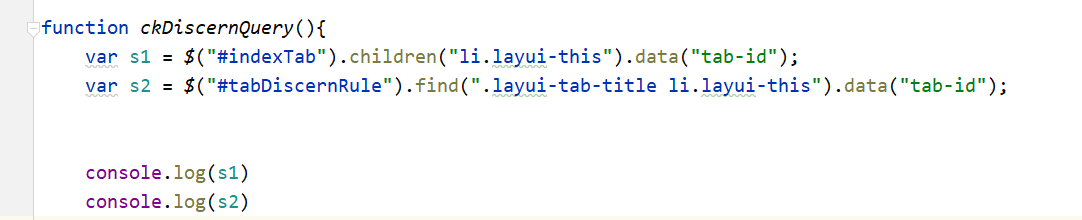
根据class获取当前标签 第二种
js
var s1 = $("#indexTab").children("li.layui-this").data("tab-id");
//机构如图
演示结果

给下拉选型赋值
js
$("#issuesType_first").find("option[value = '38000805']").attr("selected","true");
//移除选项
$("#issuesType_first").find("option[value = '38000805']").remove();添加禁用属性
js
//添加禁用
$("#issuesType").attr("disabled","disabled");页面加载完成
js
$(function(){

});给css赋值
js
$(".vspn38_table .vspn38_td_info").addClass('vspn38_td_info-active');

 $(function(){
     try {
         $(".vspn38_table .vspn38_td_info").addClass('vspn38_td_info-active');

         $(".vspn38_table .vspn38_td_info").click(function (data) {
             if($(this).hasClass('vspn38_td_info-click')){
                 $(this).removeClass('vspn38_td_info-click');
             }else {
                 $(this).addClass('vspn38_td_info-click');
             }
         });

     } catch (e) {

     }
 });


//或者
$("#gdLoading").css({"display":"flex"})css样式
css
/*通用显示详细信息表格样式*/
table.vspn38_table {
    font-family: verdana, arial, sans-serif;
    font-size: 15px;
    color: #333333;
    border-width: 1px;
    border-color: #e0e0e0;
    border-collapse: collapse;
    text-align: center;
    margin-top: 5px;
    margin-bottom: 5px;
    width: 100%;
}
table.vspn38_table td {
    border-width: 1px;
    padding: 12px;
    border-style: solid;
    border-color: #e0e0e0;
}
.vspn38_td_name{
    width: 150px;
    text-align: right;
}
.vspn38_td_info{
    text-align: left;
}
.vspn38_td_info-active{
    white-space: nowrap;
    text-overflow: ellipsis;
    overflow: hidden;
    max-width: 100px;
}
.vspn38_td_info-active:hover{
    text-overflow:inherit;
    overflow: visible;
    white-space: pre-line;
}html页面
html
<table class="vspn38_table">
        <tr>
            <td class="vspn38_td_name">会议名称:</td>
            <td class="vspn38_td_info"><span name="meetingName" >时代峻峰劳动竞赛李开复简单来说会计分录都开始减肥了看电视剧范德萨发生的纠纷克里斯对接浪费跨境电商开了房间少得可怜荆防颗粒时代峻峰</span></td>
            <td class="vspn38_td_name">会议届次:</td>
            <td class="vspn38_td_info"><span name="meetingSession">时代峻峰劳动竞赛</span></td>
        </tr>
</table>查找元素
js
//删除
var trList  = $("#jcObject").find('tbody').find("tr:gt(0)");
$.each(trList,function(index,item){
    $(item).remove();
})
//删除
$("#aiReport").children("div").remove();Checkbox
js
 $('.app-card').on('click', function () {
     var isXz = $(this).find("input:checkbox").is(':checked');
     if(isXz){
         $(this).find("input:checkbox").prop('checked',false)
     }else {
         $(this).find("input:checkbox").prop('checked',true)
     }
     layui.form.render("checkbox");

});html
<div class="app-card">
	<div class="m-app-checkbox">
		<input type="checkbox" name="DJID1" lay-skin="primary" value="1000077846" checked="" class="m-app-input">
	</div>
</div>查看元素是否隐藏或显示
js
$("#"+item).is(':visible');input框只改变事件
js
    //输入框的值改变时触发
    $("#hylxrname").on("input",function(e){
        //获取input输入的值
        console.log(e.delegateTarget.value);
        if(myIsNull(e.delegateTarget.value)){
            console.log("空了");
        }
});清除所有input值
js
$('#hyForm input').val('');绑定回车事件
js
//回车事件绑定
$('#hygjz').bind('keyup', function(event) {
    if (event.keyCode == "13") {
        //回车执行查询
        table.reload('ytDialogId',{where: form.val("ytxxform")});
    }
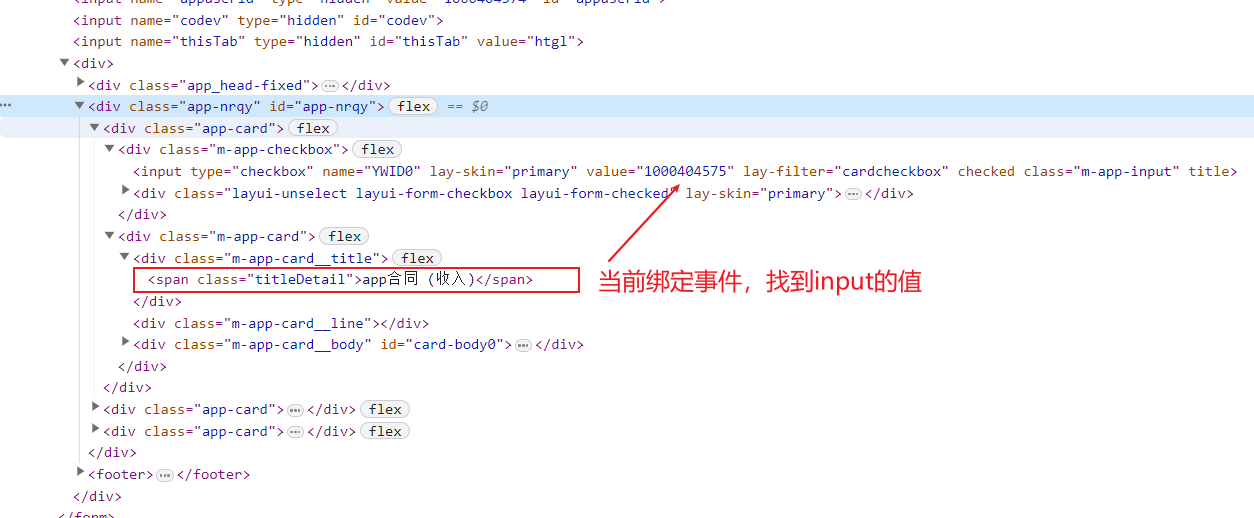
});查找dom节点
js
$('.m-app-card__title .titleDetail').on('click', function () {
    var xzYwidTemp = $(this).parent().parent().siblings().find('input').val();
    console.log(xzYwidTemp)
});根据自定义属性data取值
js
 <div class="layui-col-xs3 layui-col-tjxx layui-col-kp2xx" data-fwlx="802001"></div>
 $("#searchForm #fwlx").val(this.dataset.fwlx);